Nothing tracks you. Nothing nags you. Everything stays on your device.
Songs
Your library, on vinyl.
Pull songs from anywhere, or tell the library which chords you know — it'll show you what's ready to play and what's one chord away. Transpose any song and add a capo — chord shapes update instantly. Loop any passage, from a song or any audio you import, at half speed without shifting the pitch, or shift the key. Auto-scroll, one-tap simplify, PDF export, and setlists for jam night round it out. The library remembers everything you've sat with — quietly, in order of how recently it mattered.
Ideas
Catch the riff before it fades.
Record an idea and Guitar Buddha detects its chords and key automatically. Sketch it out in the riff tab and play it back out loud, cursor following along. Hum it, play it, write it down — mark it as a riff, a lyric, a chord — and find it later.
Jam
A backing band, on tap.
Set a key. Pick a feel. Drums, bass, keys lock in behind you. Reach for one of forty-one bundled progressions across nine packs, or build your own — the palette leads with the chords that live in your key, labeled with Roman numerals, and any chord can hold for two or four bars. Swap the groove on anything you play, or pull up a song and the band joins in with one that matches its feel. Start from a captured idea with one tap on "Jam in this key," or drill progressions in the ear trainer. Loop it, change it, record yourself over the top.
Tuner
Sharp ear. Soft display.
Standard, drop, open, DADGAD, and now Bass VI and baritone that reach down into the low end — twenty presets, plus fully custom and a sweetened mode for players who want it just-so.
Practice
Routines, drills, scales, strum.
Build a session — string together a warm-up, a song, and a few drills, then run it with a calm timer. Or start from one of three that ship with the app, and make it yours. No streaks, no pressure. Learn notes across the fretboard, or lock a scale to one position, color it by note or interval, and let Scale Coach listen while you climb it. Drill chord changes against the clock, or loop a strumming or fingerpicking pattern over eight common chords — or whichever one your song starts on. Diagrams, scale grids, and a metronome round out the shelf.
Hand-built, screen by screen
Designed for the in-between moments.
The kitchen-stool half-hour. The hotel-room ten minutes. The morning before anyone else is up.
10:15
Your Songs
Songs
Search songs, artists…
All
Recent
Favorites
Wonderwall
Oasis
Parked0 takes
Wish You Were Here
Pink Floyd
Learning0 takes
Hotel California
Eagles
Polishing0 takes
Blackbird
The Beatles
Set0 takes
Home
Songs
Ideas
Tuner
11:34
— HZ
Listening
−500+50
Tuner
Strings
E
A
D
G
B
E
♪Sweetened
i
Tuning
Standard
Mode
Auto
Reference
440 Hz
Home
Songs
Ideas
Tuner
11:34
Jam
Rock
Shuffle
Blues
Funk
Jazz
Sequence
Edit
1234
Kick
Snare
Hi-hat
Tap a step to toggle it.
96
BPM
Rock
+
−
TAP
Jam Key
Change key
C
D
E
F
G
A
B
A minor pentatonic
maj
min
Scale to practice
Minor
Pentatonic
Home
Songs
Ideas
Tuner
Beyond the phone
On your wrist. On your home screen.
Metronome, tuner, and chord diagrams on Apple Watch. The tools you reach for most are one tap from your home screen.
Apple Watch
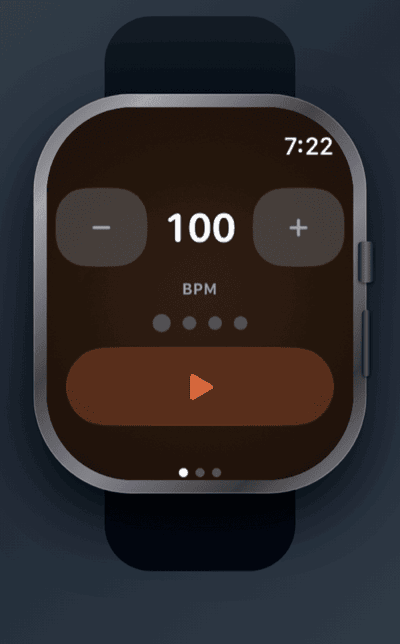
A metronome on your wrist.
Spin the Digital Crown to set the tempo. Feel every beat in haptics — no need to look down.
Apple Watch
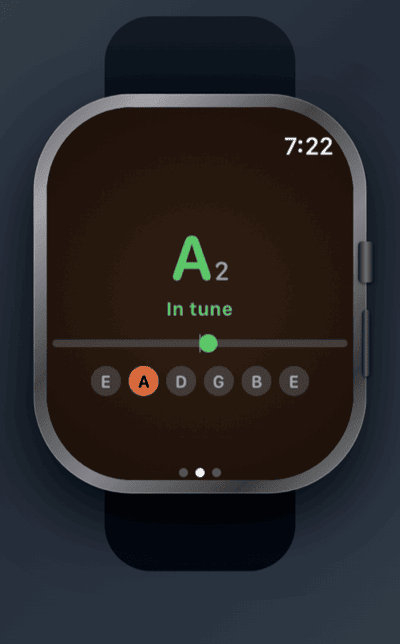
Tune up without your phone.
Open-string tuner on your wrist. Check your tuning mid-session without reaching for your phone.
Apple Watch
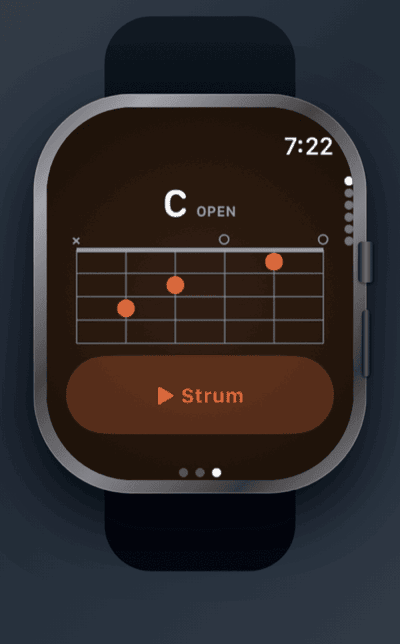
Chord diagrams at a glance.
The shape you need, right on your wrist. Tap Strum to hear it — without touching your guitar.
Home-screen widget
One tap to the tools you reach for.
Tuner, metronome, and jam — straight from your home screen, no digging through the app.
Local-first by design
Nothing leaves your phone.
No accounts. No syncing to "the cloud." No data sold or shared. Your songs, your ideas, your takes — all yours, on your device.
No accounts, ever. Open the app and you're already in.
Analytics off by default. Optional and anonymous — on only if you switch them on, never the other way around.
No internet required. Works on a plane, in a basement, off-grid.
Your takes stay on your device. Export to share — never automatic.
Your practice comes with you. Back up your log, routines, and saved setups to a file you keep — and read it back on a new phone. No account, no upload.
Pricing
Free, with a tip jar.
Every feature, unlocked from day one. No subscription. No paywall. No ads tracking you between sessions.
The app ships with four themes. Try them right here — your selection follows you down the page.
From the beta days
Notes from early players.
Before launch, a few dozen guitarists lived with the TestFlight build. Here's what they kept telling us.
★★★★★
Finally, an app that doesn't guilt me
Every guitar app turns practice into homework — streaks, XP, reminders shaming me at 9pm. Guitar Buddha just waits for me. I open it, it shows me what I've been working on, I play. I've played more this month than the whole past year.
PickupPlayer_Dave
★★★★★
The idea capture alone is worth it
I've lost so many riffs to voice memos I could never find again. Now I hum it, tag it, done. Found a riff from three weeks ago last night and built a whole song around it.
hmills_92
★★★★★
No account?? No subscription??
I expected the usual: free for 3 days, then $12.99/month for the "premium tuner." Nope. Everything's free, everything's on-device, it doesn't even ask for an email. Threw money in the tip jar immediately.
skeptical.luthier
★★★★★
A band that never complains
Set a key, pick a feel, and suddenly I have a band that's fine with practicing the same 12 bars for an hour. Recorded myself over a slow blues loop and actually heard myself improving week to week.
GarageBandDad
★★★★★
Finally nailed the tricky bridge
The loop trainer is a game-changer. I've been trying to get through the bridge of Blackbird for months — slowed it to half speed, isolated those eight bars, brought the speed up gradually. Played it clean for the first time last Tuesday.
acoustic.obsessed
★★★★★
Tuner with a sweetened mode!
40 years of playing and this is the first phone tuner I trust. Standard, drop, open tunings, plus a sweetened mode that makes my acoustic sound right up the neck, not just at the 12th fret. Soft display is easy on the eyes at 6am too. Quiet little masterpiece.
flattop_phil
★★★★★
Got me playing again after 10 years
My guitar sat in a closet for a decade because every time I picked it up, I felt behind. This app never makes me feel behind. No goals, no progress bars — just the songs I love and a gentle "what's it gonna be today?" Playing every evening now.
emily.k.taylor
★★★★★
Great for hotel-room practice
Works completely offline, which matters when you're in a venue basement with no signal. Tuner, jam tracks, my whole library — all there. Wish recordings synced between my phone and iPad, but I get why they don't do cloud. Export works fine as a workaround.
tour_van_kev
★★★★★
Good, but I miss the structure
Honestly — I like streaks and goals, and this app philosophically refuses to give me any. The tools are excellent, jam mode especially. If you're a calm-practice person you'll love it. If you need a drill sergeant, this isn't that, and it's proud of it.
metronome_max
★★★★★
The anti-app
No ads. No feed. No notifications begging me to come back. It opens fast, does exactly five things beautifully, and gets out of the way. Whoever made this actually plays guitar.
quietfingers
real notes from the TestFlight days — if the app earns a place in your practice, an App Store review means a lot.
A note from the maker
I built Guitar Buddha for the version of me who picks up the guitar at 11pm, plays for forty minutes, and forgets what he was working on by Tuesday. It's a place to put the practice. Quietly. Without anyone counting.
— see you in there
Frequently asked
Questions, gently answered.
Is it available now?+
Yes — it's on the App Store today, free, every feature included. Android is coming next.
How much will it cost?+
Nothing — every feature is free, forever. See the Pricing section for details on the optional tip jar.
Which tunings does it support?+
Standard, Drop D, DADGAD, and a range of other open and altered tunings — twenty presets in all, including Bass VI and baritone for players who go low, plus fully custom. There's also a sweetened mode for players who want the tuning just-so.
What can I do with a song once I've added it?+
Transpose it on the fly and add a capo — chord shapes update instantly. Loop a tricky passage at half speed without shifting the pitch, turn on auto-scroll, one-tap simplify, or export it as a PDF. You can also build a setlist for jam night.
Does it work without an internet connection?+
Yes — completely. Everything runs on-device: no cloud, no streaming, no account. Songs come from a built-in catalog, anything you type in, or chord sheets you scan with the camera — all offline. The network is only used for optional, off-by-default analytics and a periodic App Store version check.
Why no streaks or goals?+
Because the moment practice becomes a game you can lose, you stop. Guitar Buddha is built around showing up, not winning. The library remembers what you've sat with — that's all the tracking you need.
Can I use it with other instruments?+
Guitar-focused — the chord library, Practice drills, and tuner are all built around guitar. The jam tracks and metronome work with any instrument. If you play something else, there's a Buddha for that too: Ukulele Buddha, Bass Buddha, and Drum Buddha — the whole family lives at music-buddha.com.
Does it work on iPad?+
Yes — Songs and Ideas open side by side on the big screen, and turning the iPad sideways drops Jam into a full performance view.
Is there an Apple Watch app or a widget?+
Both. A metronome, tuner, and chord diagrams live on Apple Watch. And a home-screen widget puts Tune, Metronome, and Jam one tap from your home screen.
Will my recordings sync between devices?+
Not automatically — that would mean a cloud. You can export any take as an audio file and move it however you like. iCloud Drive support is on the roadmap as opt-in.
What happens when I get a new phone?+
Back up your data from Settings. It writes one file holding your practice log, routines, custom progressions, and saved loop and jam setups — move that file across and restore it on the new phone. Restoring only adds; it never overwrites what's already there. No account is involved and nothing is uploaded. Recordings aren't included: export those as audio files and move them the same way.
Available now
Sit down and play.
Out now on iPhone, iPad, and Mac.
Android is coming
One email when it lands.
no newsletter. no drip. just the one.
no third parties — your email goes to a server we run, and nowhere else.